Showing posts with label iPad. Show all posts

Thursday, August 23, 2012

Speech Therapy Pensieve: Part 2

After talking with a few speech colleagues in my district, I am liking the idea of using Google forms to track student contacts even more. I decided to create two additional forms. One for screenings and consultation services and another to document meetings. I'm not sure that tracking these therapeutic activities will be any faster using an iPad but I like the idea of having all the data in one place. And maybe, once I start using the forms, I will be able to glean some trends or big ideas. I was afraid that my co-professionals would think it was a dorky idea and it would be too difficult. But as it turns out, some of my speech buddies are also interested in experimenting with ways to collect and interpret student data using their iPad. My thinking is that any data collection method needs to be quick. As school speech therapists, our time with students is often brief and we need to be able to use every instructional minute wisely. Data collection cannot be so cumbersome that it steals away lots of these minutes. I anticipate that I will want to make revisions to the forms as I begin using them. Below is a screenshot of the live form for tracking screening and consultation services. Under the live form is a view of what the columns in the Google spreadsheet will look like. Any suggestions, questions, or comments are very much appreciated.

Screenshot of the live form as it will appear on my iPad.


This shot shows what the buttons will look like on my iPad.
 

Tuesday, August 21, 2012

Speech Therapy Pensieve: Part 1

A few days ago I came across two excellent blog posts from Ruth Morgan at Chapel Hill Snippets explaining how she uses Google forms to track student therapy contacts. As a literacy coach, I used Google forms to create my own digital conferring notebook and was itching to use the same approach with my speech therapy students. Ruth created an individual Google doc for each of her students which allowed her to display all therapy notes on a comprehensive spreadsheet. I liked this idea and may end up following Ruth's model but I also wanted to experiment with a single form that could capture all of my therapy notes for all of my students. Below is a screenshot of the live form I'm playing with as well as what the spreadsheet looks like. I will probably enter some dummy data to get a feel for how it will work or not work.
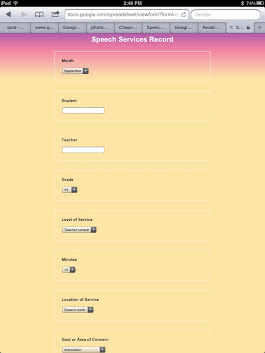
This is what the form will look like on my iPad.


This shot shows the headings for the data I want to collect.
Whenever I create a form in Google docs, I start with what information I will need and how I want it to look in the spreadsheet. In other words, I don't start by creating a form. I begin with sketching out a spreadsheet on paper, then go from there. I want my form to be simple, quick, and flexible. And I want the columns to fit across one sheet of paper in a landscape view. I usually do a test print of what the spreadsheet will look like before I finalize the questions on the form. In the future, when I need to print the information I have collected, I want it to be in a useful format. Please follow the links for the live form and the spreadsheet to take a look, ask any questions, and provide any suggestions or comments.


Thursday, August 2, 2012

Blogging Using My iPad

Kind of a boring post title. It may seem like a small thing but I've been interested in finding ways to work on multiple blog posts on the go for a while. I tend to write and publish in the early morning hours before work or late at night after finishing dishes, laundry, and school work. My work day is typically filled to the brim with activity but sometimes I have a spare minute or two that I would like to use to start drafting a post. My iPad together with the Blogsy app are making this more possible. Like many of the apps I most use frequently, Blogsy takes some effort to learn. I don't see that as a negative. My biggest issue with using my iPad to compose and post wasn't learning Blogsy but using the iPad's internal keyboard. I found that I just wasn't able to get my thoughts down fast enough. I invested in an Apple wireless keyboard which brought me instant relief. I splurged and swallowed the high price tag and I couldn't be happier. I can easily switch from the internal keyboard to the wireless keyboard according to my needs or the setting. Apple also has a trackpad that integrates with the keyboard but I don't feel the need for it. The arrow keys together with touching the screen works just dandy for me.

My keyboard is lightweight and portable. I love it!